

Clinical notes are often described as straightforward: document the concern, record what happened in the session, describe the client’s response and identify the next step.
Yet knowing what belongs in a note does not always make it easy to begin writing one.
In a discussion among therapists on Reddit , one therapist described a long-standing struggle with completing notes. The problem was not knowing what to write. The difficulty was sitting down, maintaining focus and consistently moving from one note to the next. They had already tried time blocks, breaks, rewards and working during the part of the day when they usually felt more focused.
The responses showed that this difficulty is not always solved by one productivity technique. Therapists mentioned changing locations, using body doubling, completing notes immediately after sessions, using speech-to-text and working from structured templates. One commenter explained that building a reusable note-template workflow significantly reduced the time required to complete each note.
This article explores one modest way to reduce the friction of starting: replacing the blank page with a series of smaller, checkbox-based decisions.
Important: A note builder does not treat ADHD, resolve executive-functioning difficulties or replace professional judgment. It can only provide structure that may make the first step feel more manageable.
Why Therapy Notes Can Feel Difficult Even When You Know What to Write
A blank note appears simple, but it asks the clinician to make several decisions at once:
- Where should I begin?
- Which details are clinically relevant?
- How should I describe the intervention?
- How much context is necessary?
- How should I document the client’s response?
- What progress can I accurately support?
- What belongs in the plan?
- Is the wording concise, objective and defensible?
Each decision may be small, but together they create a substantial starting demand. When several notes are waiting, the task can begin to feel like one large, undefined block of work.
Perfectionism can add another layer. A clinician may spend too long trying to produce the ideal opening sentence, worry about leaving out an important detail or repeatedly edit wording before the basic note has been completed.
The result can be a familiar cycle:
- The note feels larger than expected.
- Starting is delayed.
- More notes accumulate.
- The backlog increases pressure.
- Increased pressure makes beginning even harder.
The purpose of a structured workflow is not to remove clinical reasoning. It is to separate the task into smaller decisions so that the clinician is not solving every documentation problem at the same time.
What a Checkbox-Based Workflow Changes
Instead of asking:
“How do I write this entire note?”
a checkbox-based workflow asks:
“Which of these statements accurately describes this session?”
That change matters because selection is a smaller task than composition. The clinician still has to think carefully, but the starting point is no longer an empty text box.
The free Dr. Notes Therapy Note Builder provides three structured templates:
- Treatment Plan
- Progress Note
- Mental Status Exam
The clinician selects relevant items, reviews the assembled wording and edits the result before using it. Custom items can also be added when the available wording does not accurately describe the client or session.
The tool is therefore best understood as a drafting aid. It helps organise information; it does not determine what is true, clinically relevant or appropriate to document.
A Practical Workflow for Getting One Note Started
When documentation feels overwhelming, try reducing the goal from “finish all my notes” to “complete the next decision.”
Step 1: Choose the Document You Need
Start by selecting one template:
- Use Treatment Plan when defining a problem, goal, objective and intervention.
- Use Progress Note for a session summary, including interventions, focus, symptoms, response, progress and plan.
- Use Mental Status Exam to document findings that were actually observed or assessed.
For a routine follow-up session, the Progress Note may be the most practical place to begin.
Step 2: Begin With the Easiest Section
You do not have to complete the note from top to bottom.
If you clearly remember the intervention, select that first. If the agreed homework is easiest to recall, begin with the plan. If the client’s main concern is obvious, start with symptoms or focus area.
The first completed section creates momentum and reduces the amount of the note that remains undefined.
Step 3: Select Only What Is Supported
Choose statements that accurately reflect the session. More selections do not necessarily produce a better note.
Avoid selecting an item because it sounds professional or because it commonly appears in documentation. Every statement should be supported by what the client reported, what the clinician observed or what occurred during the session.
Step 4: Generate a Workable First Draft
The first draft does not need to be perfect. Its purpose is to give you something concrete to review.
Once the selected statements are assembled, the task changes again. You are no longer creating a note from nothing; you are reviewing and refining an existing draft.
Step 5: Edit for Accuracy and Individuality
Before using the draft, check:
- Does it accurately describe this specific session?
- Are any statements repetitive?
- Does the client’s response logically follow the intervention?
- Does the progress statement match the evidence available?
- Is the plan specific enough to be useful?
- Are the treatment-plan problem, goal and objectives consistent?
- Is risk documentation based on an actual assessment?
- Is any important context missing?
Remove anything that was not assessed or did not occur. Add concise individual detail where it is clinically necessary.
Step 6: Transfer the Reviewed Note Into the Appropriate Record
The tool allows the draft to be copied, printed or downloaded as a PDF. The clinician remains responsible for placing the final, reviewed content into the correct clinical record and following applicable organisational, professional and legal requirements.
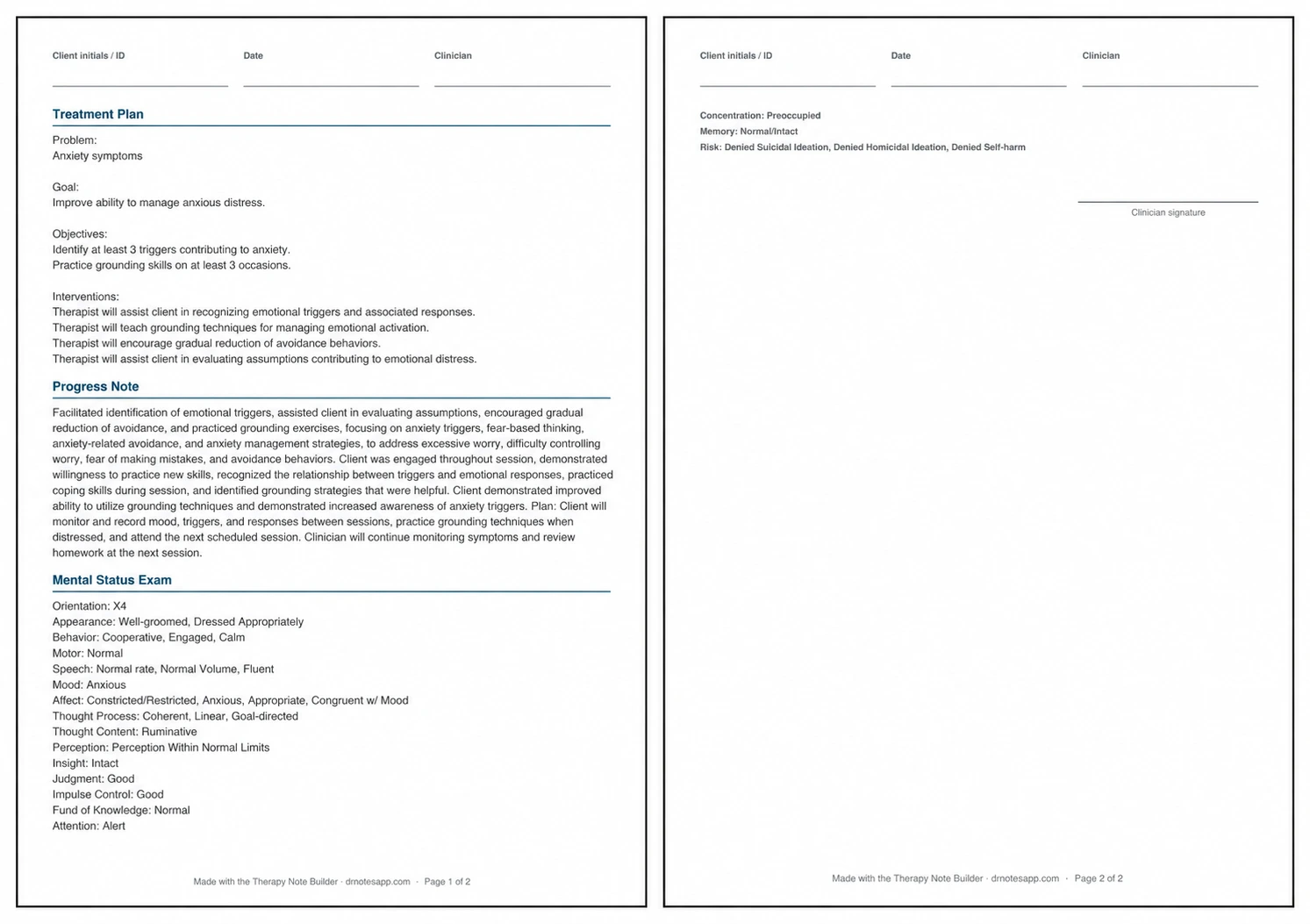
Worked Example: Work-Related Anxiety and Avoidance
Consider a fictional adult client attending an individual follow-up session for work-related anxiety.
The client reports excessive worry about making mistakes, repeatedly checks completed work and delays difficult tasks because of fear that the result will be inadequate. Worry continues into the evening and interferes with relaxation. The client has begun practising grounding and reports that it is sometimes helpful.
There are no reported trauma-related symptoms in this example, and the client denies suicidal ideation, homicidal ideation and self-harm.
Treatment Plan Selections
How This Workflow May Help With a Documentation Mental Block
The Reddit discussion was not primarily about a lack of knowledge. The therapist knew what notes required but struggled with task initiation and sustained attention.
A structured builder may be a little helpful in this situation because it can:
Reduce Blank-Page Friction
The clinician begins with organised categories rather than an empty note.
Reduce the Number of Simultaneous Decisions
Interventions, focus, symptoms, response, progress and plan are separated into distinct sections.
Provide a Visible Completion Path
Moving through defined sections may feel more concrete than facing an undefined writing task.
Support Consistent Terminology
Reusable wording can reduce the effort involved in repeatedly translating familiar clinical work into concise documentation language.
Make Review Easier Than Initial Composition
For some clinicians, editing a draft is easier than producing the first sentence. The tool moves the work toward review more quickly.
These are modest workflow benefits. They should not be described as treating ADHD, eliminating executive dysfunction or guaranteeing faster documentation for every clinician.
Combine the Tool With Strategies That Fit How You Work
The Reddit responses suggest that no single approach works for everyone. A checkbox-based builder can be combined with other practical strategies.
Complete a Brief Draft Immediately After the Session
When possible, capture the main intervention, response and plan while the session is still fresh. Even a short structured draft can reduce the effort required later.
Change the Physical Context
Some therapists report that moving to a quieter room, standing at a desk or working in a shared space helps signal that it is documentation time.
Use a Short, Visible Work Interval
Rather than committing to an entire backlog, choose one note or one brief time block. The goal is to reduce the threshold for starting.
Consider Dictation for Individual Details
Speech-to-text may help clinicians capture session-specific context before editing it into appropriate clinical language. Privacy, consent, organisational policy and data-handling requirements still apply.
Use Body Doubling or an Accountability Routine
Working alongside a colleague, joining a scheduled documentation period or using a consistent end-of-day routine may make the task easier to initiate.
Separate Drafting From Editing
First build the basic note. Then review it for accuracy, concision and compliance. Trying to draft and perfect every sentence simultaneously can increase friction.
Important Clinical and Privacy Boundaries
The Therapy Note Builder assembles wording selected by the user. It does not assess a client or verify the accuracy of the selections.
Clinicians should:
- Avoid entering identifying information into a public browser-based tool.
- Select only findings that were assessed, observed or reported.
- Review risk-related wording carefully.
- Confirm that treatment-plan goals match the identified problem.
- Ensure progress statements are supported by the session.
- Remove generic or repetitive wording.
- Follow applicable laws, professional standards and organisational policies.
- Transfer only the reviewed, final note into the authorised clinical record.
If a browser tab is closed, selections may need to be entered again. The tool should therefore be used as a drafting workspace rather than as a permanent patient-record system.
Start With One Smaller Decision
When notes feel overwhelming, “complete the entire backlog” may be too large a starting instruction.
A smaller instruction might be:
- Open one note.
- Choose one template.
- Select one accurate intervention.
- Complete one section.
- Review one generated draft.
The Dr. Notes Therapy Note Builder cannot remove every barrier associated with clinical documentation. It does not replace clinical reasoning, and it is not a treatment for attention or executive-functioning difficulties.
What it can do is replace an empty page with a sequence of smaller, organised choices. For a clinician who knows what to document but is struggling to begin, that little bit of structure may be enough to make the first step easier.
Important: This article provides general information about documentation workflows. It does not constitute clinical, legal, regulatory or information-security advice. Clinicians remain responsible for the accuracy, appropriateness and compliance of every clinical record.
Comments
Have a question, or a way you handle this in your own practice? Share it below.