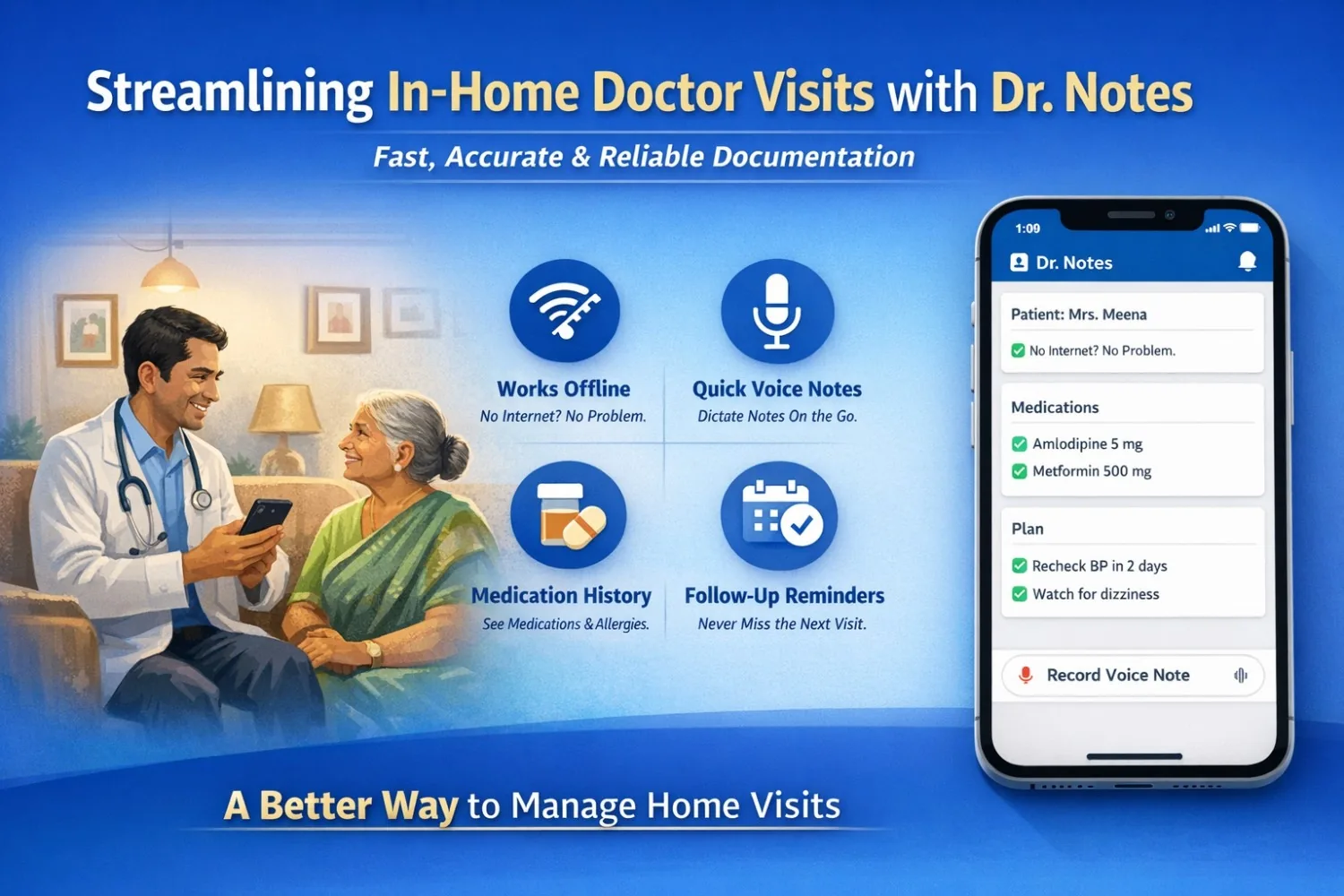
In-home doctor visits (house calls) feel simple on paper: go to the patient, assess, treat, and move to the next home. In real life, they are high-pressure, time-boxed, and documentation-heavy—often in places where the internet is weak, histories are unclear, and follow-ups get missed.
That’s where Dr. Notes fits: an offline-first patient notes app that helps home-visit doctors capture details quickly, maintain continuity, and avoid “what happened last time?” confusion.
Why In-Home Visits Get Messy (Even for Experienced Doctors)
Home visits come with constraints that clinics don’t:
- Internet is unreliable (apartments, villages, lifts, basements, gated communities).
- Patients forget medicine names and doses (they show half-torn strips or old photos).
- Family members describe symptoms differently, so timelines get mixed.
- Vitals and findings are noted on paper/WhatsApp and rewritten later (often incomplete).
- Follow-up plans get lost between multiple visits and multiple staff.
- If another doctor visits next time, continuity depends on memory—not records.
Over time, these “small misses” can lead to repeat complaints, wrong assumptions, duplicated medicines, missed red flags, and frustrated patients.
What Dr. Notes Changes for Home-Visit Workflows
1) Works Fully Offline (No Signal Required)
You can:
- open the patient profile
- check the last visit notes
- add today’s note
- save the plan
2) Keeps Visit History Chronological
Every home visit becomes a clean timeline. On the next visit, you immediately see:
- what you suspected last time
- what you prescribed
- what improved / didn’t improve
- what you asked the family to monitor
3) Shows Medications, Allergies, and Key Flags Clearly
Instead of asking the same questions again, you can confirm quickly:
- current medicines
- known allergies
- past conditions
This is especially useful for elderly patients and chronic cases.
4) Supports Voice Notes for On-the-Move Documentation
Home visits are fast. When typing isn’t practical, voice notes help capture:
- symptom story
- exam observations
- counselling points —without losing details.
5) Helps You Remember Follow-Ups
Home-visit care is often “continue + review.” Dr. Notes helps you store:
- next check date
- what to monitor
- what to repeat (BP, sugar, wound check, etc.)
- warning signs you explained to the family
Try Dr. Notes on Mobile
- Secure On-Device Data
- Instant Voice Notes
- Simple Patient Management


Scenario: The “Which Tablet Was It?” Problem
Dr. Arjun runs a “Doctor Visit at Home” service and does 8–10 visits a day. One issue repeats often:
“Doctor, last time you gave some tablet… we don’t remember the name.”
Patient: Mrs. Meena (62)
She has BP and diabetes. A call comes at 7:30 AM: “She feels weakness and dizziness since last night.”
Without Proper Continuity
At the home, the family shows:
- an incomplete BP medicine strip
- a random supplement
- an old photo of a sugar tablet
They can’t confirm doses. Dr. Arjun checks her, writes a quick note on paper, and moves to the next visits.
Later, when he tries to rewrite notes from memory, key details get missed:
- exact BP reading
- what the patient said
- what advice was given
- what follow-up was planned
With Dr. Notes
Even without internet, he opens Mrs. Meena’s profile at the doorstep and instantly sees:
- last visit notes in order
- regular medicines
- allergies (if any)
- last follow-up instructions
He records today’s visit quickly:
- symptoms
- vitals
- assessment
- plan + follow-up
If he’s in a hurry, he records a short voice note and saves.
Next Day Becomes Easy
On the next visit (even if another doctor goes), they can immediately see:
- what happened last time
- what the plan was
- what to monitor
No guessing. The visit becomes faster and safer.
Where Dr. Notes Helps Most
- Chronic follow-ups (BP, diabetes, asthma, thyroid)
- Elderly patients on multiple medicines
- Wound checks / post-procedure follow-ups
- Team-based home visit services
Simple Note Format Inside Dr. Notes
- Complaint + duration
- Vitals
- Key findings
- Assessment
- Treatment / advice
- Follow-up + warning signs
Why Not a Full EMR/EHR?
Full EMR/EHR systems are powerful, but for home visits they can feel too heavy.
Common problems:
- too many screens and steps
- often needs stable internet
- slow to open and complete notes during busy visits
- made more for hospitals than doorstep work
That’s why Dr. Notes fits home visits:
- works offline
- quick notes (typing or voice)
- clear visit history
- simple follow-up reminders
Home visits need speed and continuity — Dr. Notes is built for that.
Final Takeaway
Home visits work best when documentation is fast and available anywhere. Dr. Notes gives home-visit doctors a clean timeline, offline access, quick notes, voice capture, and follow-up reminders—so the service runs smoothly even on busy days.
Try Dr. Notes on Mobile
- Secure On-Device Data
- Instant Voice Notes
- Simple Patient Management
Comments