
Clinical documentation tools can save typing, but their privacy and workflow choices matter. In psychiatry, a recording may include details about trauma, relationships, substance use, safety and treatment that a patient did not expect to leave the consultation room. Before choosing a dictation or AI scribe tool, clinicians should understand what it records, where speech is processed, where the result is stored and who can access it.
“Cloud AI scribe” and “on-device dictation” describe different architectures. Neither label alone tells you whether a product is appropriate for your clinic. Review the actual workflow, settings, vendor terms and patient communication before using either one.
Why the choice deserves care in psychiatry
A psychiatric consultation can include highly personal disclosures and clinical observations. Some patients may be uncomfortable with recording or with audio being sent to an external service. Others may prefer a recording because it helps them participate or supports accurate documentation. Ask about the person’s preference, explain the process plainly and offer a meaningful way to decline where recording is optional.
Recording can also change how people speak. A microphone, visible or unobtrusive, may affect rapport or lead someone to hold back. A transcript can mishear names, medication details, negations or context. Generative systems can introduce additional errors if they turn speech into a summary or assessment. A clinician still needs to review the source and author the clinical interpretation.
Follow the audio and transcript data path
Ask the vendor to show the complete path from microphone to saved record. Cloud products differ: some send audio or segments to a provider or subprocessor for recognition, while their retention, access and deletion terms also vary. On-device speech recognition processes audio on the phone or tablet, but separate backup or sync settings may still copy records to a cloud account.
Cloud speech processing
- 1CaptureAudio is recorded by the app or device.
- 2TransferAudio or segments may be sent to a vendor service.
- 3ProcessCheck which provider and subprocessors handle speech.
- 4Return and retainVerify where transcripts are saved and how long data remains.
On-device speech recognition
- 1CaptureRecord on the clinician’s phone or tablet.
- 2Transcribe locallyThe speech model processes audio on that device.
- 3ReviewCheck the transcript against the saved audio.
- 4Choose sync settingsBackup or sync may send records to a selected cloud account.
What Dr. Notes does—and what it does not
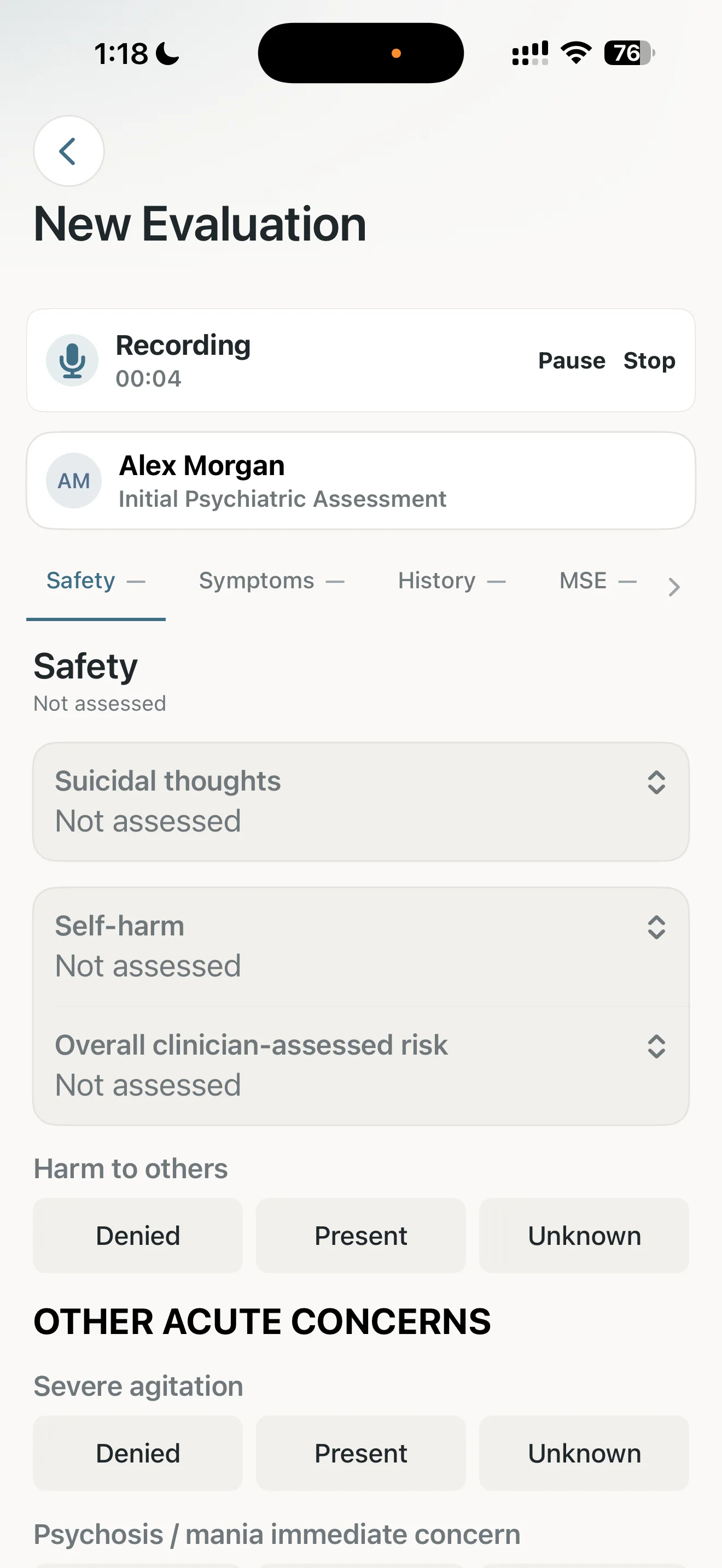
Dr. Notes for Psychiatry supports recording within an evaluation and preparing a transcript on the device. Clinicians can revisit the saved audio and transcript while reviewing that visit. Speech recognition can be used offline when the required model is available on the device. This is clinician-directed recording and transcription, not an always-listening ambient service that automatically generates a complete clinical assessment.
Recording within a Dr. Notes evaluation
HIPAA and where recordings are stored
For US practices, HIPAA applies to covered entities and business associates; it is not a general certification label for an app. HHS says a cloud service that creates, receives, maintains or transmits ePHI on behalf of a covered entity or business associate generally has business-associate obligations, including a written BAA. This can apply even when the cloud provider stores encrypted data and cannot decrypt it. See the HHS guidance on HIPAA and cloud computing.
Cloud scribe arrangements differ. Audio or transcripts may be processed or retained by a vendor or its subprocessors, depending on the product and configuration. Before use, ask what leaves the device, where it is stored, who can access it, how long it is retained, whether it is used to train models, how deletion works, and whether a BAA covers the specific product and plan you will use. A BAA or encryption alone does not establish that a clinic’s overall use meets HIPAA requirements.
Dr. Notes handles the transcription step on the device using its bundled speech model; audio and transcripts are not sent to Dr. Notes servers or a transcription API. Records are stored in the app on the device by default. Sync and backup are separate: iOS private iCloud sync is on by default and can be turned off under Profile › Storage › Sync with iCloud; Android Google Drive backup and restore are optional and controlled in the app’s backup settings. When enabled, those services may store records that include audio and transcripts under the applicable Apple or Google account and service terms.
Dr. Notes does not receive patient records and does not act as your HIPAA business associate or provide a BAA. Our Psychiatry privacy details explain storage and sync by platform. Clinicians and organisations remain responsible for deciding whether their device, account, sync settings and recordkeeping workflow meet the laws and policies that apply to them. Review the vendor terms and your organisation’s requirements before enabling cloud backup or sync.
Dr. Notes does not replace the clinician’s judgment or automatically create an independently verified formulation from a transcript. Review the audio, correct transcription errors and write or edit the final clinical note yourself. It is not a separate supervision or psychotherapy process-note workspace, and importing audio from an external recorder is not an established workflow.
A cautious workflow for a follow-up visit
- Check the rules first. Confirm that recording is permitted by local law, your professional guidance and your organisation’s policy. Explain the purpose, who can access the recording, where it may be stored and how long it will be kept.
- Ask before recording. Obtain and document any consent or authorisation required for the people and setting involved. Make clear that declining will not affect access to care when recording is optional.
- Record only the intended visit. Use the app’s recording control for the consultation or documentation task you have explained. Stop recording when that task ends.
- Verify details at the source. Reopen the visit, play the relevant audio and compare it with the transcript. Correct errors in names, dates, medications, doses, risk statements and negations.
- Complete the clinical record. Add observations, interpretation, formulation and plan based on your assessment. Do not treat a transcript or generated summary as a signed clinical note without review.
- Review storage and retention. Check iCloud or Google Drive sync, device access, backup ownership, export destinations and your clinic’s retention and deletion policy.
Questions to ask before adopting an AI scribe
- Does the product record continuously, record only when I start it, or transcribe dictated notes?
- Where does speech recognition run, and what audio or text leaves the device?
- Which vendors or subprocessors can access audio or transcripts? What are their retention and deletion terms?
- What happens when a patient declines recording, and can the tool be used without it?
- Can the tool work offline, and does the speech model need to be downloaded or prepared first?
- What data is included in backups, cloud sync and PDF exports?
- Does the product transcribe speech, draft a note, or generate clinical interpretation? Who verifies each step?
In India, section 23 of the Mental Healthcare Act, 2017 sets out a right to confidentiality for mental health information, and section 24 addresses information stored in electronic or digital form. The Digital Personal Data Protection Act, 2023 also establishes obligations for personal-data processing. Which duties apply, and when, depends on the parties, purpose, jurisdiction and applicable commencement provisions. These laws do not certify a particular app or architecture as compliant; seek qualified advice for your setting. See our guide to mental-health records and Indian data-protection law.
Choose the workflow that fits the patient and the practice
Cloud and on-device tools each require careful review. For some clinics, a cloud service may fit after vendor, contractual and organisational checks. Other teams may prefer local transcription and explicitly managed sync settings. A patient may prefer no recording at all. The practical standard is to understand the data path, explain it honestly, protect the record and verify every clinical detail before it enters the chart.
Learn more about the Dr. Notes Psychiatry app, offline medical notes and how app storage and sync work.
Comments
Have a question, or a way you handle this in your own practice? Share it below.